



This short guide explains what prompts are, how they work, and how adding more detail can change the results you get from an AI chatbot.
1. What Is a Prompt?
A prompt is the message you type into a chatbot such as ChatGPT, Claude, CoPilot etc. It’s how you tell the AI what you want.
A prompt can be:
- A question
- An instruction
- A description
- A request for ideas or help
The clearer your prompt, the more useful the response.
2. Basic vs. Advanced Prompts (Text)
Small changes in your wording can completely change the outcome.
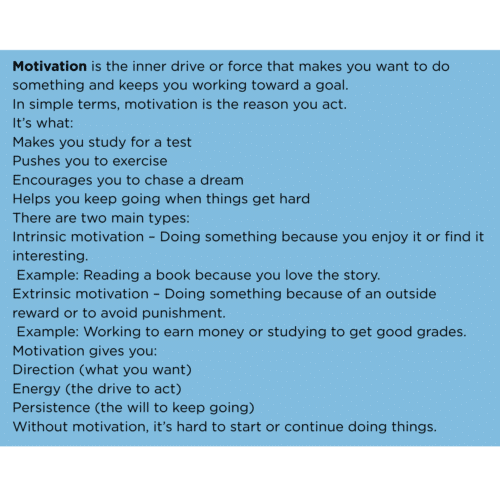
Basic Prompt Example
Prompt: “Explain what motivation is.”
Outcome: A simple, general explanation.
More Detailed Prompt
Prompt: “Explain what motivation is in simple language and give one everyday example.”
Outcome: A clearer explanation with something relatable.
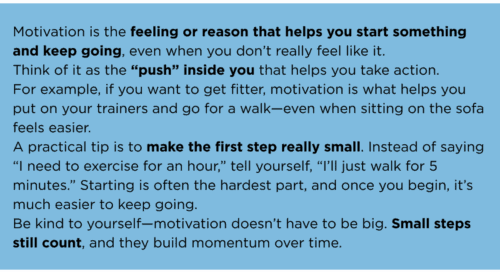 Advanced Prompt
Prompt: “Explain what motivation is in simple language for someone who struggles to stay focused. Include one example and one practical tip. Keep it friendly.”
Outcome: A personalised, helpful answer that feels more relevant.
3. How Adding Details Changes the Outcome
Adding extra information helps the chatbot understand:
- Who the response is for (children, adults, beginners, learners)
- How you want it written (simple, formal, friendly, creative)
- What format you want (bullets, steps, a short paragraph)
- How long it should be (one sentence, 100 words, one page)
- What to include (examples, tips, comparisons)
- What to avoid (jargon, long explanations)
The more context you give, the more accurate and useful the answer.
4. Useful Prompt Ingredients
Here are things you can add to make your prompts stronger:
- Purpose: What you want the chatbot to do
- Audience: Who the content is for
- Tone: Friendly, formal, simple, upbeat
- Format: List, paragraph, steps, script
- Length: Short, medium, long
- Examples: Ask for one or more
- Style: Creative, factual, humorous
- Constraints: “Avoid long words”, “Keep it simple”
5. Example Prompt Upgrades (Text)
Basic: “Write a short story.”
Better: “Write a short story about a lost dog finding its way home.”
Advanced: “Write a short, heart‑warming story (around 150 words) about a lost dog finding its way home. Use simple language and end with a positive message.”
6. Creating Image Prompts
Image prompts work the same way as text prompts: the more detail you give, the better the result.
6.1 Basic vs. Advanced Image Prompts
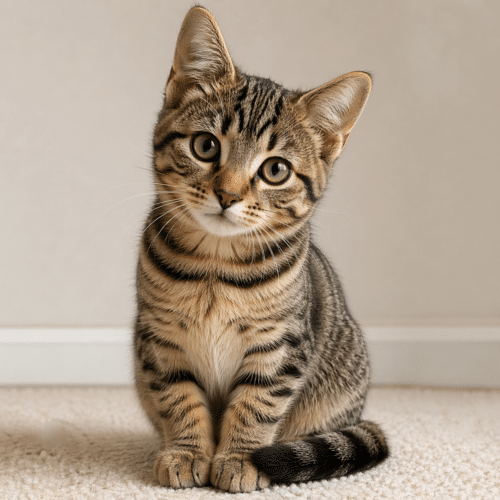
Basic Image Prompt
Prompt: “Draw a cat.”
Outcome: Any random cat.
Better Image Prompt
Prompt: “Draw a ginger cat sitting on a windowsill.”
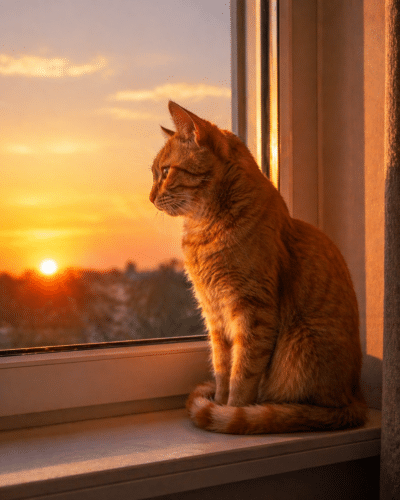 Outcome: More specific and predictable.
Advanced Image Prompt
Prompt: “Draw a ginger cat sitting on a windowsill during sunset, warm lighting, soft shadows, realistic style.”
Outcome: A detailed, visually rich image.
6.2 Useful Ingredients for Image Prompts
To improve image prompts, include:
- Subject: What the image is about
- Setting: Indoors, outdoors, city, nature
- Lighting: Bright, soft, dramatic, sunset
- Style: Realistic, cartoon, sketch, cinematic
- Mood: Calm, energetic, mysterious
- Colours: Bright, muted, warm, cool
- Composition: Close‑up, wide shot, portrait, landscape
6.3 Example Image Prompt Upgrades
Basic: “A beach.”
Better: “A quiet beach with gentle waves.”
Advanced: “A peaceful beach at sunrise with soft pink skies, gentle waves, footprints in the sand, and a calm, warm atmosphere. Realistic style.”
7. What Chatbots Can Help With
Chatbots can support you with a wide range of everyday tasks, such as:
- Writing messages, letters, and posts
- Summarising long text
- Creating ideas for projects or hobbies
- Explaining things in simple terms
- Helping with planning and organisation
- Turning rough notes into clear writing
- Brainstorming names, titles, or themes
- Creating checklists or step‑by‑step guides
- Helping with learning or practising new skills
- Generating creative content (stories, poems, scripts)
- Offering suggestions for problem‑solving
- Creating image prompts for art or design
- Helping you think through decisions
8. Final Tip
Think of prompts as instructions. The more detail you give, the more the chatbot can shape the answer to suit you.
Create your own ‘Tone of Voice’ guides for Text and Images. Attach this in your AI Chatbot and ask it to remember that guide when creating any text or images – only works when logged in.
You can download this in a printable format: DOWNLOAD HERE